07 November 2008
Google Dev Fest
08 October 2008
Mark your spot With Google Map Maker
Map your place and be part of the Google Map Community.
Introducing the Google Map Maker you can use this tool to map your place and put information on places that you know. The information you put will be push in the Google Map Community so that other user can use it.
The best thing here is that the community is involve in producing the map data, in this process we the users are assured with the most accurate data on a map location
Here is how to use Google Map Maker:
Step 1: Goto http://www.google.com/mapmaker
Step 2: Sign-in to your google account or register if you don't have one

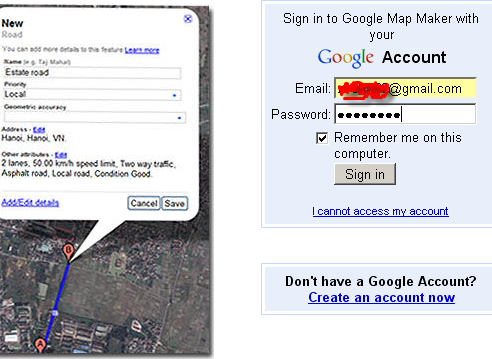
Step 3: Know your place and share your knowledge.
Here is how you do it.
1. Choose a tool you will use.
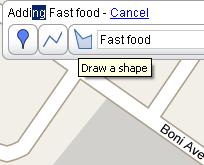
2. Mark your target location and Put the information

16 July 2008
Get Exchange rate using Google
Did you know you can convert your currencies to another currencies using google search here's how.
Sample 1:
Sample 2: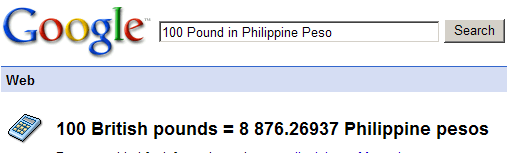
27 May 2008
Googe Earth Like Application on iPhone
This is simply wicked cool. Although I'm not a huge fan of the iPhone, in terms of it being a cell phone, I'm immensely impressed by its touch screen interface. Here's an example of that interface being put to amazing use by a company called Earthscape, who produces a virtual Earth app that is similar to Google Earth. Take a look at this video which shows how you can get the Earth to spin by moving the phone around.
23 May 2008
Third-party ads on the Google content network
The Google content network now accepts display ads served from qualified third-party vendors. Third-party ad serving has been a longstanding request from top brand AdWords advertisers who use third parties to create and manage their online campaigns. Initially, we will be only accepting third-party ads in English, but we hope to expand to other languages soon.
Making the Google content network more accessible to large brand advertisers also benefits AdSense publishers and end users. Third-party ad serving will introduce a greater variety of advertising into the Google content network, increase the inventory of quality display ads competing to show on AdSense publisher sites, and offer more engaging ads for end users. In the long run, we believe the increased inventory and ad competition will result in increased revenue for many AdSense publishers.
Rest assured that ad quality on the content network will remain one of our highest priorities. Only advertisers with whom we have proven relationships and who've clearly demonstrated commitments to our quality standards may participate in this program. And our policies governing ad content and formatting are unchanged.
How to control third-party ads shown on your site
The same ad management features for Google ads also apply to third-party ads. You can use the Ad Review Center to filter specific placement-targeted ads from appearing on your site. To block contextually-targeted ads from a given advertiser, you can use the Competitive Ad Filter. (The Ad Review Center currently only shows placement-targeted ads, not contextually-targeted ads.)
Optimizing your site to allow third-party ads
To allow third-party ads on your site:
- Opt into image ads - Currently, third-party ads are only available in image or Flash, so they won't appear in text-only ad units.
- Enable advertisers to target your AdSense channels - Most advertisers who use third-party ads are brand-conscious. They prefer to specify websites where their ads will appear in order to optimize the targeting and effectiveness of their campaigns.
- Opt into placement targeting - Placement targeting will allow advertisers to target their ads specifically to your site.
Following these steps will enable your site to accept third-party ads. However, we can't guarantee where or when third-party ads will appear on your site.
Want to learn more about third-party ads? Visit our FAQ.


28 October 2007
PR4 ( Page Rank 4 )
My Google PR ranking boosted from PR2 to PR4. wala lang natuwala lang ako hehe..
PR4
What is a PR (Page Rank)
PageRank is a link analysis algorithm that assigns a numerical weighting to each element of a hyperlinked set of documents, such as the World Wide Web, with the purpose of "measuring" its relative importance within the set. The algorithm may be applied to any collection of entities with reciprocal quotations and references. The numerical weight that it assigns to any given element E is also called the PageRank of E and denoted by PR(E).
PageRank was developed at Stanford University by Larry Page (hence the name Page-Rank) and later Sergey Brin as part of a research project about a new kind of search engine. The project started in 1995 and led to a functional prototype, named Google, in 1998. Shortly after, Page and Brin founded Google Inc., the company behind the Google search engine. While just one of many factors which determine the ranking of Google search results, PageRank continues to provide the basis for all of Google's web search tools.
Read More at Wiki...